





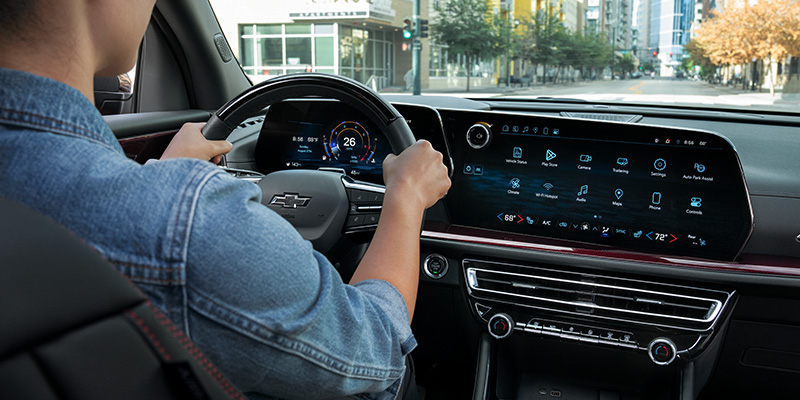
If you spend a lot of time behind the wheel, the technology inside your vehicle matters just as much as what’s under the hood. Chevy has made serious strides in its infotainment lineup, and features like wireless Apple CarPlay®, Android Auto™, and connected services make every drive more convenient. Understanding what these features mean and can do will help you get the most out of your vehicle for every drive around Terrell, Texas.
What Is the Chevy Infotainment System?
Chevrolet’s infotainment system is built around a touchscreen interface that serves as the hub for navigation, audio, communication, and vehicle settings. Depending on the trim level you choose, screen sizes and feature sets can vary, but the overall experience is always intuitive and user-friendly. The system is available across a wide range of models, from the Trax and Trailblazer to the Silverado and Tahoe. Knowing a few Chevy infotainment tips and tricks goes a long way toward making the most of everything the system offers.
Wireless Apple CarPlay® and Android Auto™
One of the most talked-about upgrades in recent Chevy models is wireless smartphone connectivity on compatible vehicles. Wireless Apple CarPlay® and Android Auto™ compatibility lets you mirror your smartphone’s apps, contacts, music, and maps directly onto the touchscreen without a cable. You’ll be able to set your phone down, hop in, and your preferred apps connect automatically. Navigation through Google Maps or Apple Maps, hands-free calls, and streaming music are all accessible without ever picking up your phone. It’s a practical feature that makes a real difference on your daily drive.
OnStar® and Connected Services
Beyond phone connectivity, Chevy vehicles offer a suite of connected services through OnStar®. OnStar® Connected Services can include features such as Automatic Crash Response, Emergency Services, Roadside Assistance, Remote Commands, Vehicle Diagnostics, and more, depending on the vehicle and active service plan. Many Chevrolet models also offer an available In-Vehicle Wi-Fi® Hotspot that can connect up to 18 compatible devices, helping passengers stay connected during longer trips. These connected services work alongside the infotainment system to support your safety no matter where the road takes you.
Google Built-In and Additional Features
Select Chevy vehicles now include Google built-in functionality, which brings Google Maps, Google Assistant, and access to Google Play apps directly into the infotainment system. This means many navigation and voice-control features can be accessed without connecting your smartphone, although some features require an eligible data connection or active service plan. The myChevrolet mobile app also extends your control beyond the vehicle itself, allowing eligible owners to remotely start compatible vehicles, check vehicle status, and manage eligible OnStar® Connected Services from a smartphone. These Chevy infotainment tips and tricks can help new owners discover features they may not have known they had.
Getting the Most From Your Setup
Understanding your infotainment system takes a little time, but it’s worth the effort. Start by updating your system software through the MyChevrolet App to make sure you have the latest features available. Pair your phone via Bluetooth® first, then enable wireless Apple CarPlay® or Android Auto™ through your phone’s settings. Customize your home screen shortcuts to put your most-used apps front and center. Inside Chevy Infotainment: Wireless Apple CarPlay®, Android Auto™, and Connected Services are designed to work together seamlessly – and once everything is set up, the experience is remarkably smooth.
Visit Platinum Chevrolet to Explore These Features in Person
Reading about infotainment features is one thing – experiencing them firsthand is another. The team at Platinum Chevrolet is ready to walk you through everything the latest Chevy models have to offer. Whether you’re eyeing a Trailblazer, a Silverado, or something in between, you’ll find knowledgeable staff who can help you understand Inside Chevy Infotainment. Stop by and see what’s waiting for drivers in Terrell, TX at platinumchevytexas.com.
Connect with us


- 2026 Chevrolet
- 2026 Chevrolet Colorado
- 2026 Chevrolet Trailblazer
- 2026 Chevrolet Trax
- Chevrolet Trailblazer
- Chevy Infotainment System
- Chevy Silverado 1500
- Chevy Silverado 2500HD
- Chevy Silverado 3500HD
- Chevy Silverado inventory
- Chevy Silverado lineup
- Chevy Suburban
- Chevy Tahoe
- Chevy technology
- Dallas Chevrolet Dealer
- Dallas Chevrolet Service
- Dallas Used Cars
- Platinum Chevrolet
- Platinum Chevrolet Service
- Platinum Chevrolet Terrell, TX
- Terrell Chevy Dealer
- Uncategorized